RCS Software: Send RCS Online

Romain Didelot
Share :
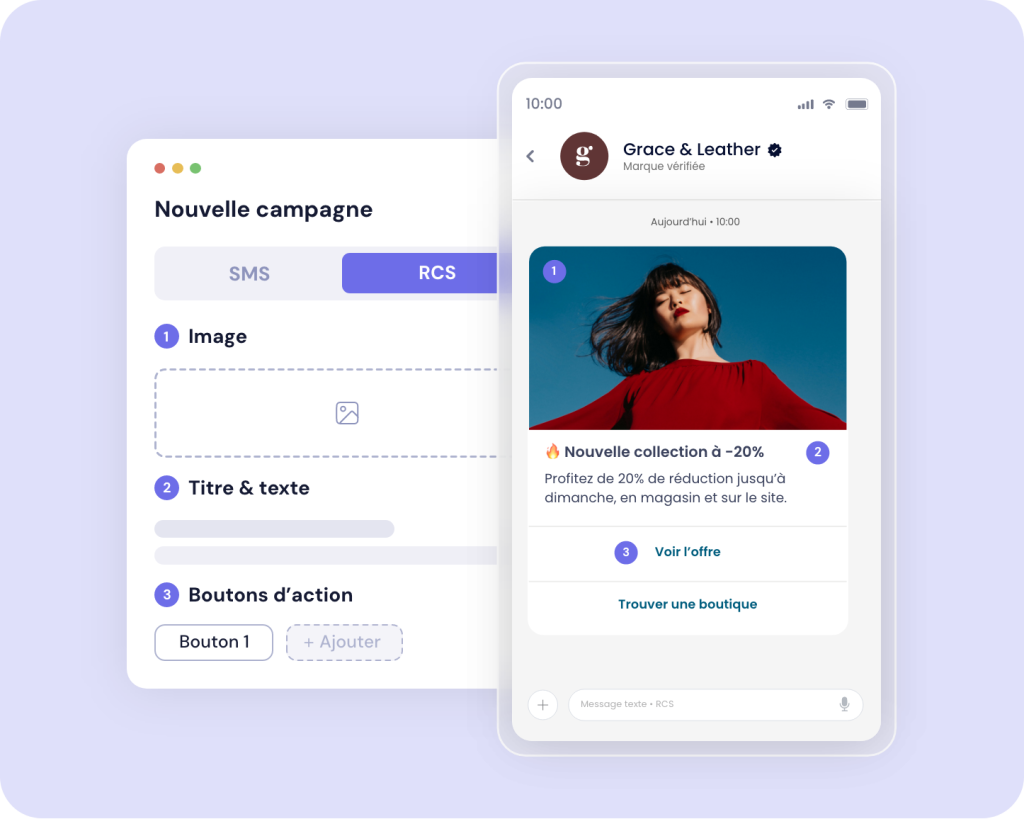
Sending a business RCS message no longer requires custom development or an agency. Now, you can compose rich messages, send them to your customers, and track your results using online RCS software. To learn everything about RCS software, its features, what you can do on your own, and how to send your first message from the smsmode interface, follow this guide!
What is RCS software?
RCS (Rich Communication Services) is a new international standard established by the GSM Association (mobile carriers and manufacturers) to replace the SMS. RCS messages are delivered directly to the phone’s native messaging app. Your customers don’t need to install anything. For businesses, this is known as RCS for Business or RCS Business Messaging: this is the business version of the standard, developed in partnership with Google and mobile carriers.
RCS software is the tool that enables a company to use this type of messaging—from creating the sender’s (agent’s) identity to composing, sending, and tracking the results of messages. It can be accessed in two ways: through a web interface (the focus of this guide) or through an API integrated into your own systems.
How the RCS Differs from the Traditional " SMS "
- Content: The " SMS " carries plain text. The RCS message supports long text, images, videos, carousels, and clickable buttons.
- The sender (agent): Instead of just a name or number, your customers see your verified identity, complete with your logo and brand colors.
- Interaction: Where the web SMS s a link, RCS offers action buttons (visit the site, call, book) and suggested replies.
- Measurement: In addition to read receipts, we track when messages are opened and every click, providing more detailed statistics on your campaigns.
What is the purpose of an RCS app for a business?
RCS is no longer an experimental channel: 421 brands were using it in France by the end of 2025, 2.5 times more than a year earlier. (source: Af2m)
The most common uses:
- Marketing: An offer featuring a product image and a "View Offer" button, instead of a shortened link.
- Customer relations: appointments, events, and after-sales service—all delivered in an interactive and conversational manner.
- Notifications: order tracking or alerts, featuring the brand's logo to reassure the recipient.
- Support: Suggested responses that guide the customer without requiring them to type anything.
Real estate experts capture attention, make listings easier to read, and turn interest into action with RCS

What an online RCS software program lets you do on your own
Not all RCS solutions offer the same level of autonomy. Here are the criteria that determine whether you’ll be able to work without relying on a developer or an agency.
- Manage your agents. You need to view the agents already approved for your brand and select the one to handle each shipment. This is essential once you have multiple brands or multiple uses.
- Create rich messages without coding. Text , images, buttons, card carousels: you build them right in the interface, with a true-to-life preview.
- Target your recipients. Import contacts, create groups, or add them manually. As with SMS, your contacts must have opted in to receive RCS messages. Good news: consent obtained for SMS also applies to RCS.
- Plan for incompatible recipients. Some recipients in your database will not receive the RCS. Therefore, failover SMS must be included as a feature. Check what the tool provides in this case.
- Track your results. Send history, statuses, statistics: without metrics, it’s impossible to improve your RCS campaigns.
- Keep SMS and RCS in one place. A single tool for both channels saves you from having to juggle multiple platforms.
In the interface smsmode©, you'll find a list of your agents, their deployment progress, your sent messages, and your message history—all alongside your usual SMS messages—in a unified messaging system.
How to Send a Professional RCS, Step by Step
Prerequisites : to be a customer smsmode© and have a validated RCS agent for your brand (see the next section if you don't have one yet).
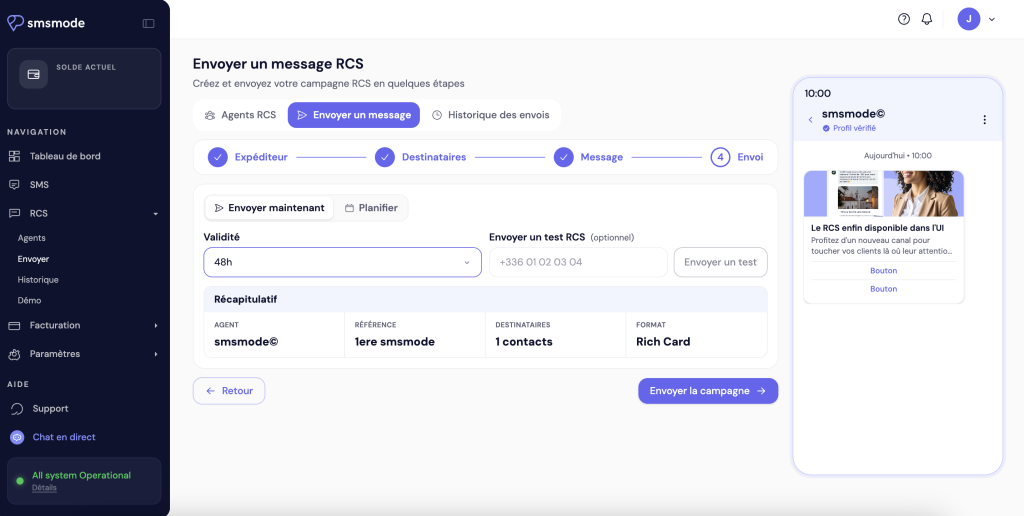
- Open the RCS panel. In the side menu, click RCS. If an RCS channel is already configured, you'll be taken directly to it. Otherwise, the interface will prompt you to create one.
- Go to the RCS channel for the agent you plan to use.
- Select your recipients.
- Compose your message. Write your text, add your images and buttons, and then check how it looks in the preview.
- Send.
- Track your shipments in the history section.
To return to your SMS, click on SMS in the side menu, or select a channel SMS from the selector at the top of the page. Your SMS posts remain the same: same pages, same functionality.
The RCS area is currently in beta: it is updated regularly. For a more comprehensive overview, see our knowledge base article.
The RCS agent: a supervised process, available from all providers
Before sending your very first mailing, your brand must have an RCS agent: this is the profile that appears to your recipients, featuring your name, logo, colors, and a description of your business.
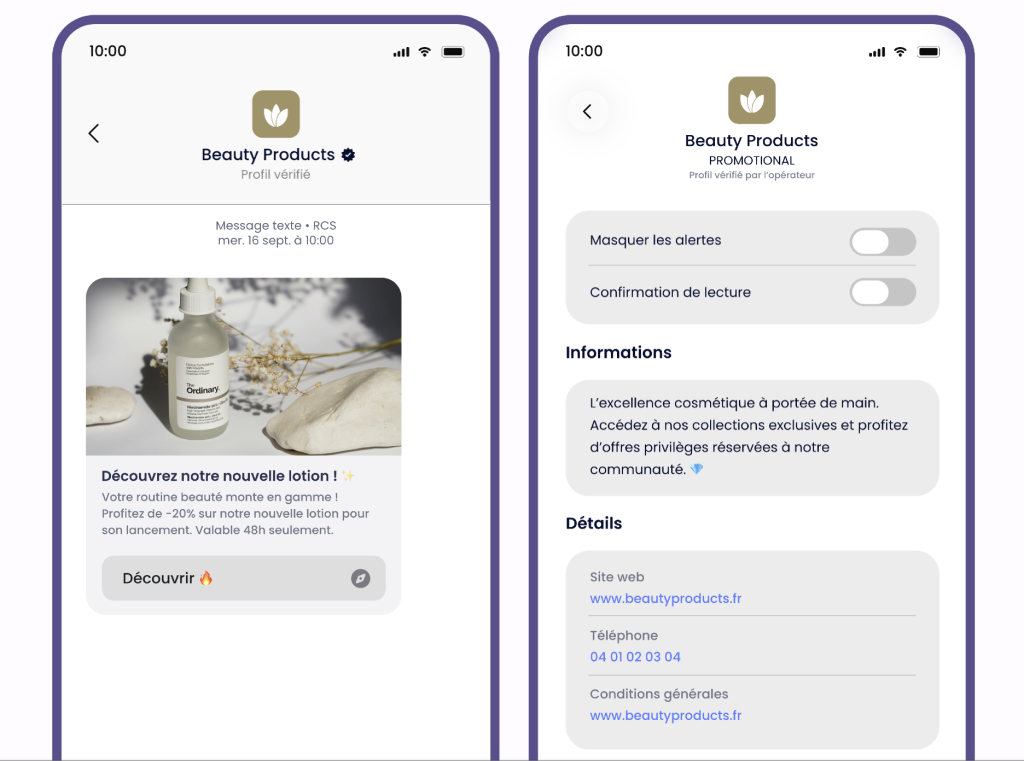
No RCS messaging platform allows this step to be completed entirely on your own, and that’s actually a good thing. To go “live,” the agent must be approved by Google and by all carriers in the country where you want to send messages. smsmode© checks the application before submitting it to avoid time-consuming back-and-forth or rejection by the provider, and then enters into a contract with you.
It is this verification process that assures your customers that the message is indeed coming from you, and that makes the RCS impervious to spoofing.
At smsmode©, your sales representative is here to assist you with this process today
The ability to submit agent requests directly from the interface will be available in an upcoming version.
Once the agent has been approved, everything else is handled independently.
Interface or API: Which Should You Choose?
Both access methods use the same agent and are not mutually exclusive.
The interface is suitable for campaigns you set up yourself: promotions, ads, and one-time reminders. It is designed for marketing or customer service teams that do not require any specific technical skills.
The API is ideal for messages triggered by your systems: order confirmations, appointment reminders, delivery notifications, conversations initiated by an incoming message, and workflows. It integrates with your website, app, or CRM, and automates regular message volumes. Discover our RCS API
Many companies use a combination of both when messages are sent by different departments: the API for transactional messages and the interface for campaigns.
FAQ
Do you need technical skills to send RCS messages?
No. From the interface, everything can be done in just a few clicks. The API, on the other hand, requires integration by a technical team.
Does RCS work on the iPhone?
Yes. Apple has integrated RCS starting with iOS 18. In France, it is available to iPhone users on all carriers: Orange, Bouygues Telecom, Free Mobile, SFR, and other MVNOs. According to Af2m, the number of compatible smartphones surpassed 50 million in the fourth quarter of 2025, representing 83% of the national mobile subscriber base.
What happens if my recipient can't receive an RCS?
You can reach them via SMS ! That’s what the RCS validity period is for: from the smsmode interface or through your tools, you can create a contact list using the numbers that did not receive an RCS by the end of the validity period, so you can contact them via SMS —this is what’s called a failover.
How long does it take to approve an RCS agent?
The timeframe may vary depending on the country and the circumstances. In France, it takes between 5 and 7 days for an agent to be fully deployed.
I already use smsmode© for my SMS : what's different now?
No information about your shipments at SMS. The RCS section has been added to your interface; you can use it whenever you like.
Try out our SMS platform and benefit from 20 free test credits, with no obligation.