Generate and share short links for your mobile messages
A short link generator integrated into your customer area, to convert a link into a short URL of just 12 characters. No manipulation or external tools required. This short link can be used in SMS, RCS or WhatsApp Business messages. Get a short link for landing pages created via the smsmode© feature, or for any other URL (landing page, website, mobile application, social networks, etc.).
This URL shortener feature is only included in Classic, Medium and Premium subscriptions.

Why shorten my link via smsmode© ?

- Character economy particularly suited to SMS constraints
- Better visibility of the link in its communication
- Short link clickable on all devices and operating systems (iOS, Android, etc.) thanks to their top-level domain.
- Insertion in the body of SMS, RCS and WhatsApp Business messages
- Use within all our solutions (SaaS platform, API, plugins & connectors, etc.)
- Clicks statistics included for campaign CTR.
How to shorten a URL and insert a short link on the platform smsmode© ?
When you include a short link in your message, all you need is 12 characters (the length of a short link, smsmode©) in place of the original link. If you don't want to personalize your short link, you can skip to step 2: using and tracking short links.
smsmode© has set up an automatic reduction of all your links, whatever the solution used (online platform, API, Mail2SMS...) as well as an option to add "https". You can have these options activated by your account manager.
STEP 1
Creating a short link
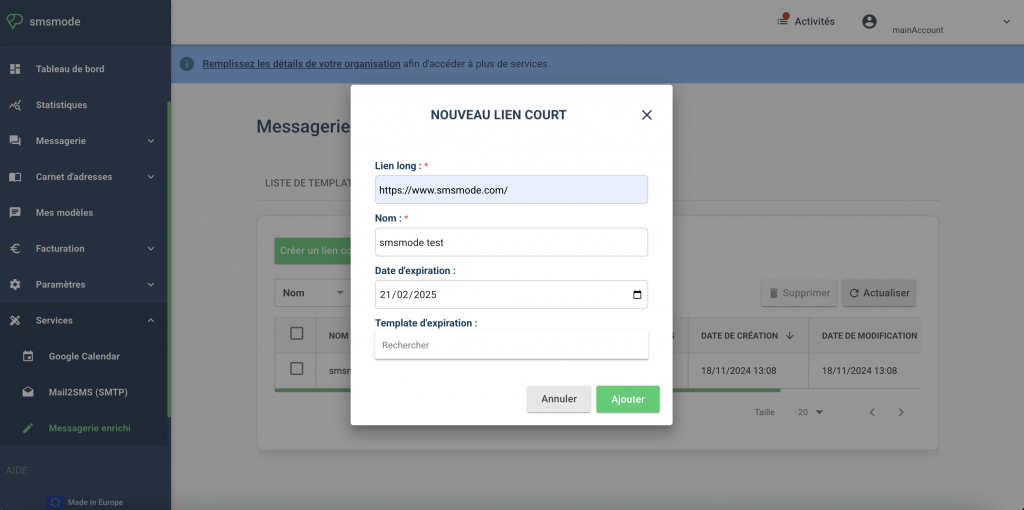
- Go to the 'Enhanced messaging' tab on the left of the 'Services' menu in the customer area.
- Click on 'Create a short link' to create your first short link.
- Enter the URL you wish to shorten and give your link a name (optional) so that you can find it later.
- Choose the expiration date for your short link. By default, it expires after one month.
- Confirm the creation of this short link by clicking on 'Add'.
A URL that has already been shortened will remain the same short link (unless deleted).
STEP 2
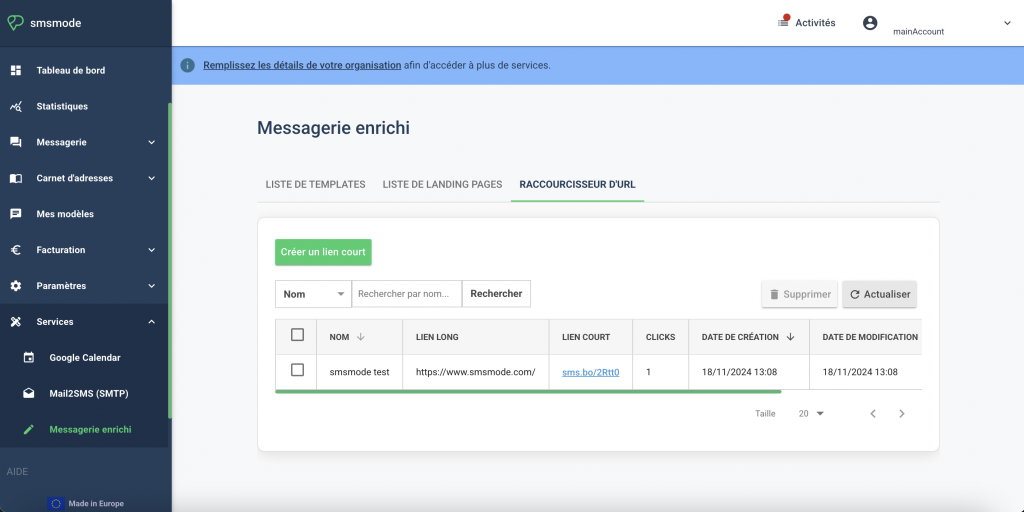
Using and tracking short links
- Copy and paste your generated short link into your message. This short 12-character link can be used regardless of the solution you use ( SMS editor in your messaging system or others).
- Track the number of clicks on your link. Please note: the number of clicks is updated in real time, but only by refreshing the page.
- Find a short link from the list using a keyword search.
- Delete a generated short link at any time by ticking the relevant URLs and clicking on 'Delete'.
Create your free account
Try out our SMS platform and benefit from 20 free test credits, with no obligation.