SMS long: send messages without length limitation

Take advantage of a feature that lets you manage your campaigns effectively . SMS no length restrictions. A per-message fee applied in increments for messages exceeding 160 characters. A character counter to help you determine how many SMS and keep your costs under control.
THE TRUST OF YOUR FAVORITE COMPANIES

Discover the features of SMS long

A feature that lets you write the message you want, no matter how long it is.

Send SMS with SMS quality

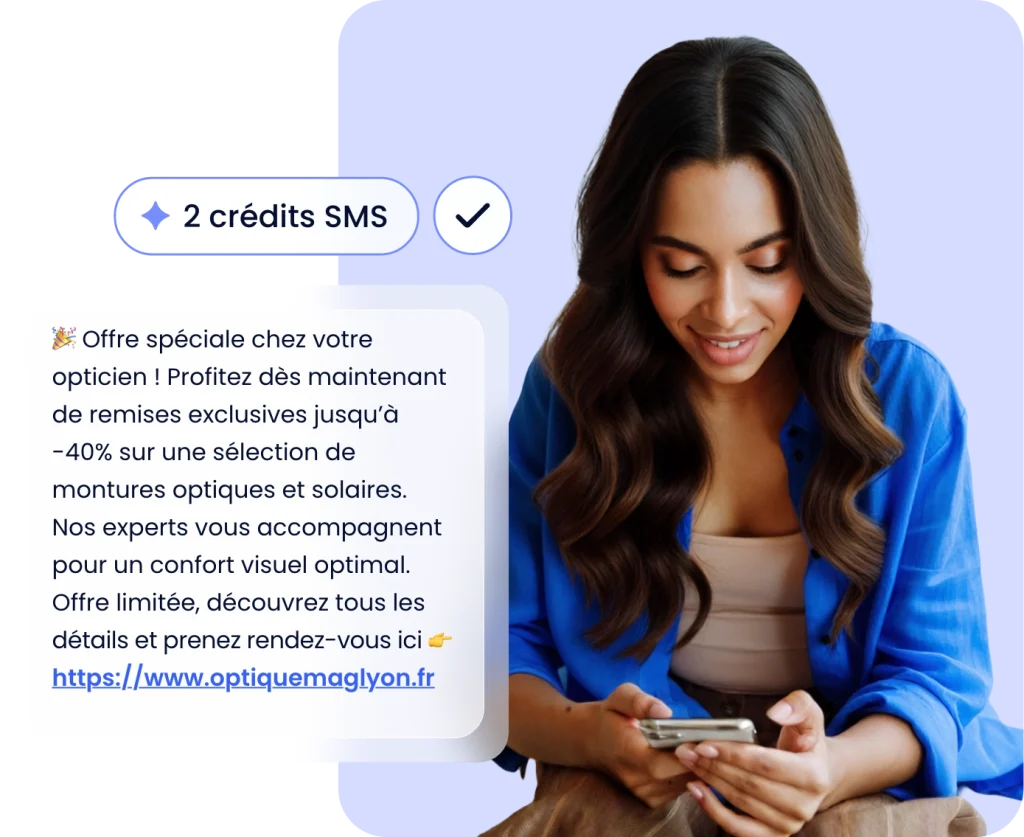
Is 160 characters too short? Break free from the SMS character limit SMS a long text message. Give clear instructions, provide exact addresses… A SMS is just as good as the SMS . Thanks to the direct connection with smsmode©It offers full functionality (sender personalization, link insertion, reception statistics).

A transparent solution with controlled shipping costs

The long SMS message is received as a single message at no extra cost to the recipient. The total cost of SMS depends on its length:

1 SMS: 0 to 160 characters
2 SMS: 160 to 306 characters (7 characters in each SMS for concatenation)
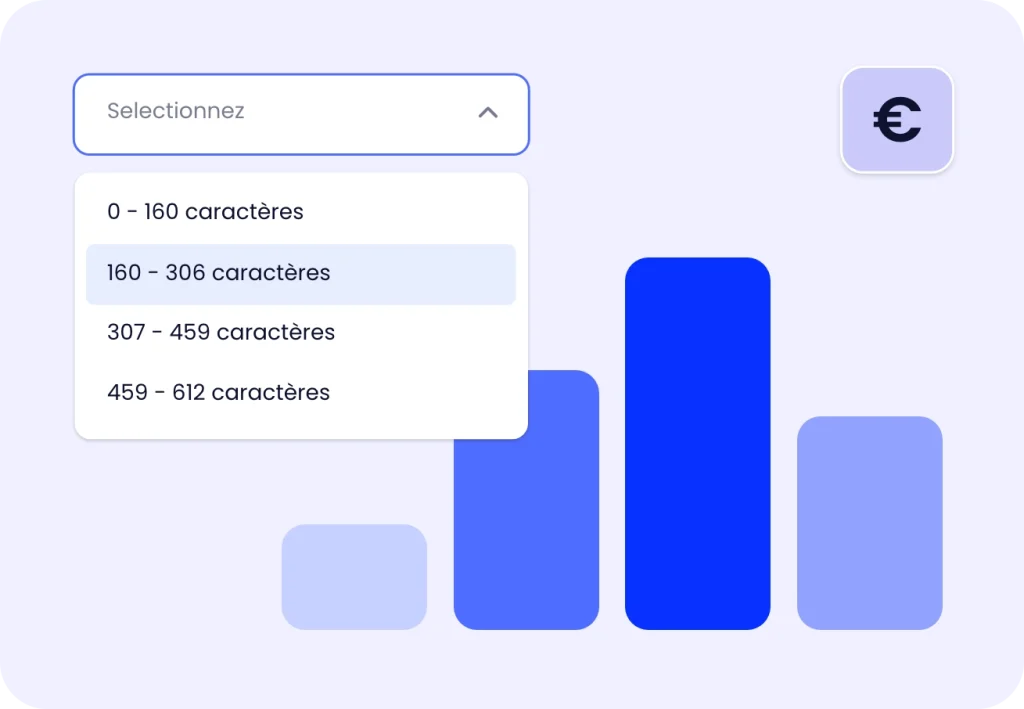
3 SMS: 307 to 459 characters (7 characters in each SMS for concatenation)
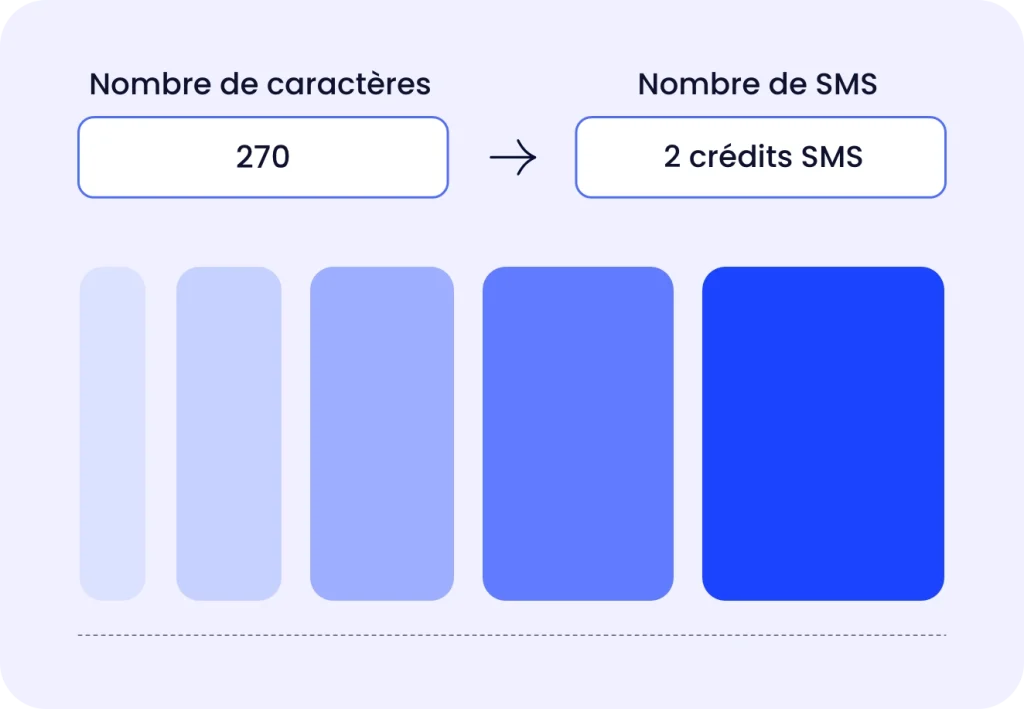
Character counter and calculation of the corresponding number of SMS

Check the length of your message in real time. The message editor in your customer portal displays the estimated number of SMS on the length of your message, so you can check the cost before sending it.

How is SMS managed in your customer area?

Counting the number of characters and SMS

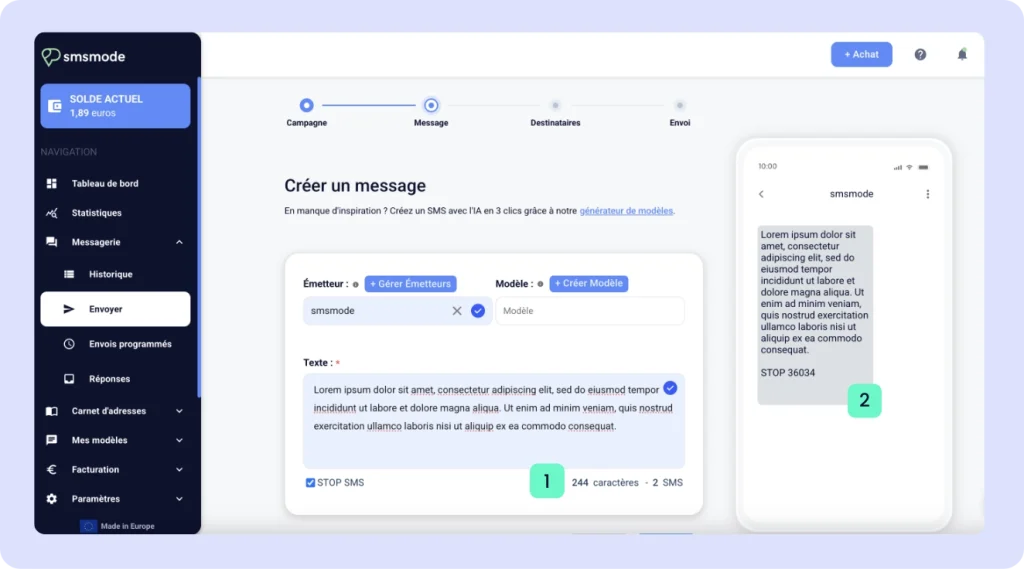
When composing your message, you’ll see two counters (1) in the lower-right corner of the “Text” field (where you enter your message). They show the number of characters in your message (including the SMSSTOP SMS text) and the number of SMS per message. The preview on the right (2) lets you see how your SMS will look.
Create your free account

Try out our SMS platform and benefit from 20 free test credits, with no obligation.

Need more info?
We look forward to hearing from you.

The SMS template to simplify your your campaigns

If you regularly send the same message to your customers, you can use your customer area to edit your own SMS templates, predefining the message. When you send out your various campaigns, you can now fill in the message with a single click!

The " SMStemplate" function to simplify the writing of regular messages

Create as many SMS templates as you like

Simply manage, modify or delete your message templates at any time, with a single click. When creating your SMS campaign, simply choose the predefined SMS template from the drop-down menu in the "template" field.

sms answer

The SMS templates are suitable for all types of SMS (SMS ProUnicode SMS or Voice SMS ). You can also consult our list of SMS examples for inspiration.

Managing SMS models on your account

How do I access my SMS templates?

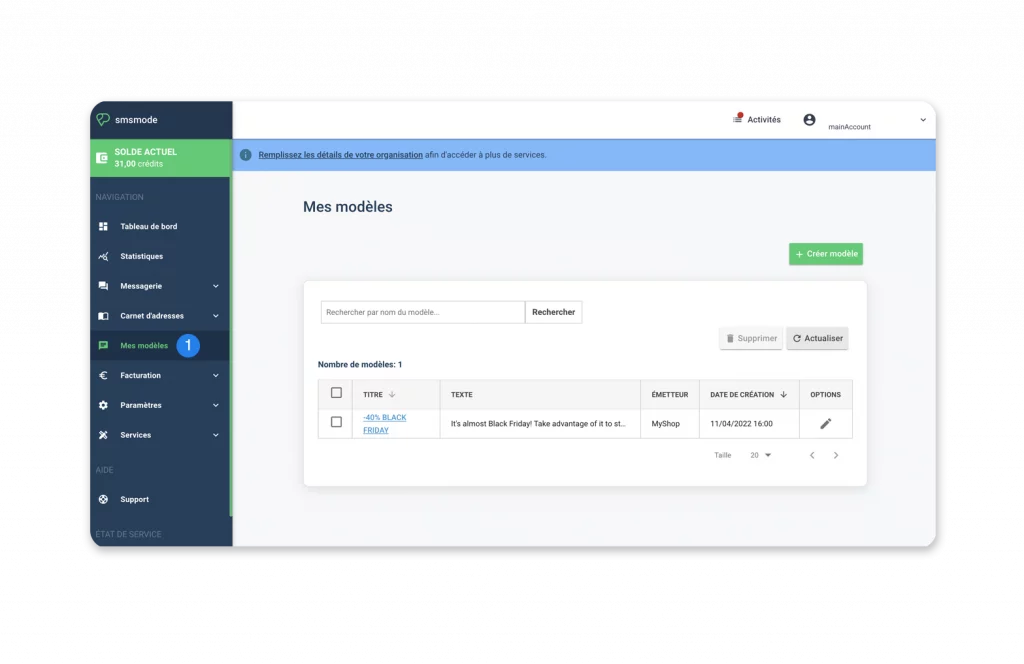
First, go to My templates ( 1).

In the summary table, you'll find all the templates you've already created. From this page, you can create, modify or delete your templates.

How do I create a new SMS template?

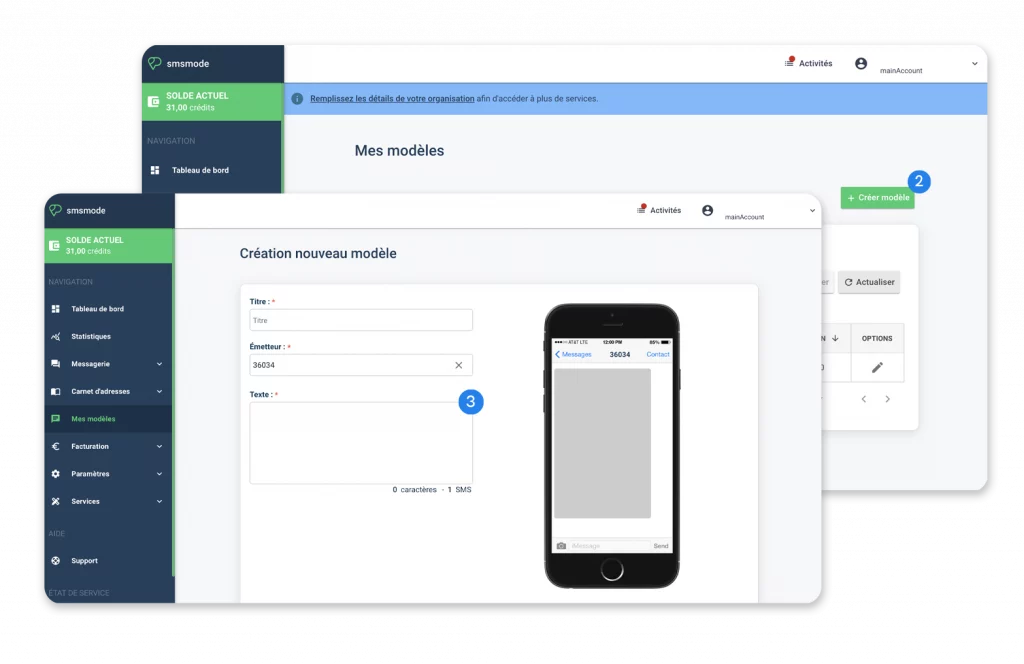
Click on the Create template button (2). On the new page that appears, simply fill in the various fields (3): the template name (title), the sender chosen for this type of message and finally the text; then validate by clicking on the Save button.

How do I modify an existing SMS template?

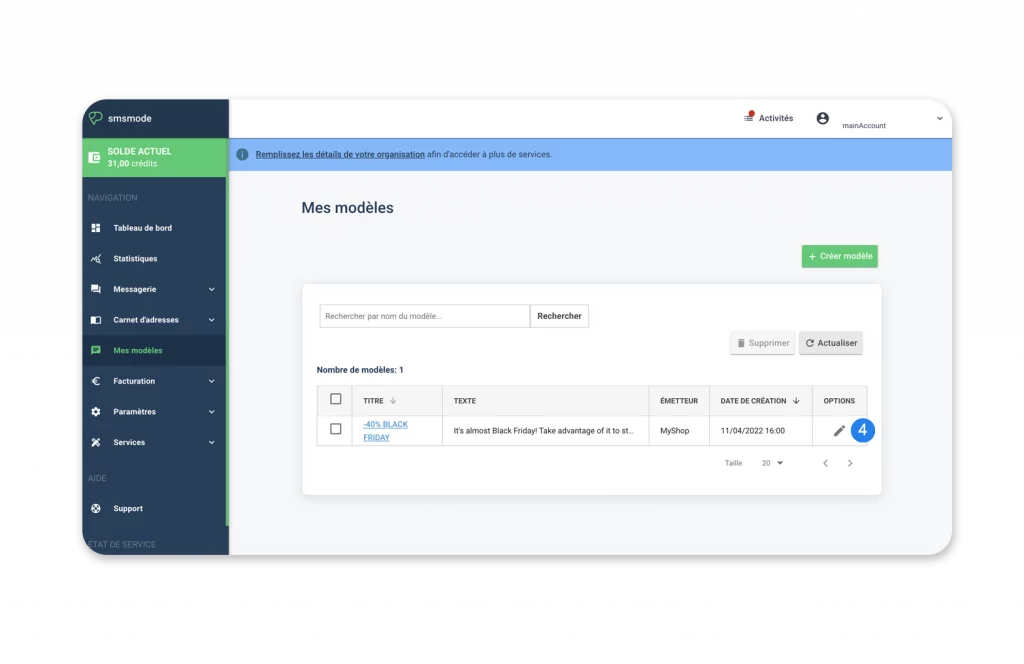
Click on the pencil button (4) from the template page to modify your template parameters.

How do I apply an SMS template when creating a new campaign?

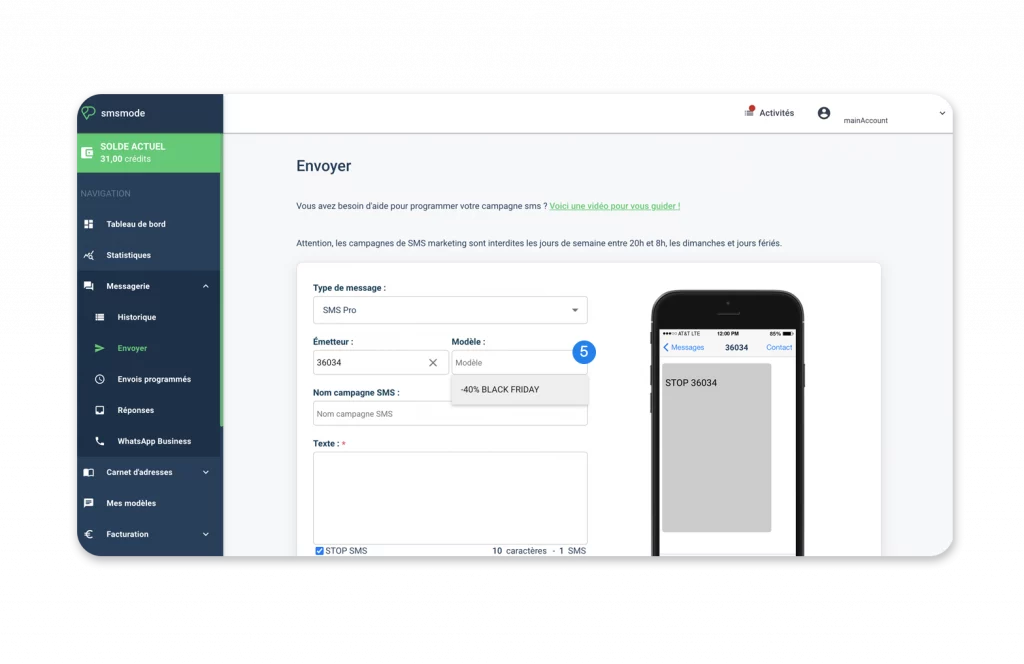
When you create a new campaignRegardless of the type of SMS you choose, a drop-down menu to the right of the Sender field lets you select the SMS model(5).

Once the template has been selected, the message and sender fields are automatically filled in.

Create your free account

Try out our SMS platform and benefit from 20 free test credits, with no obligation.
Need more info?
We look forward to hearing from you.

A personalized transmitter for easy identification

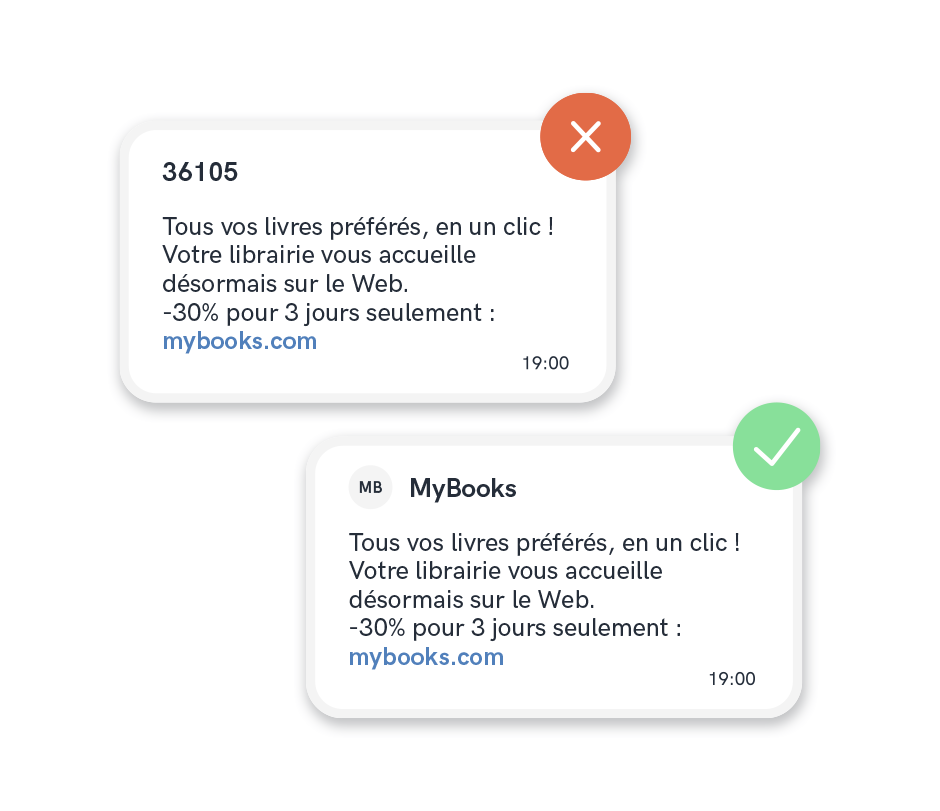
Display your brand or company name as the sender of your messages. Personalizing the sender of your SMS messages allows you to be directly identified by your customers.

Be clearly identified with the
"personalized transmitter" feature

Custom transmitter

Simple interaction between you and your customers.

The recipient will therefore receive an SMS that displays the chosen name (company name, brand, etc.) instead of a standard or short number.

NAMELY:

How can I manage my personalized in your customer area?

Complete, autonomous management of your personalized issuers is accessible at any time, in just a few clicks, from your customer area.

1. Create a custom transmitter

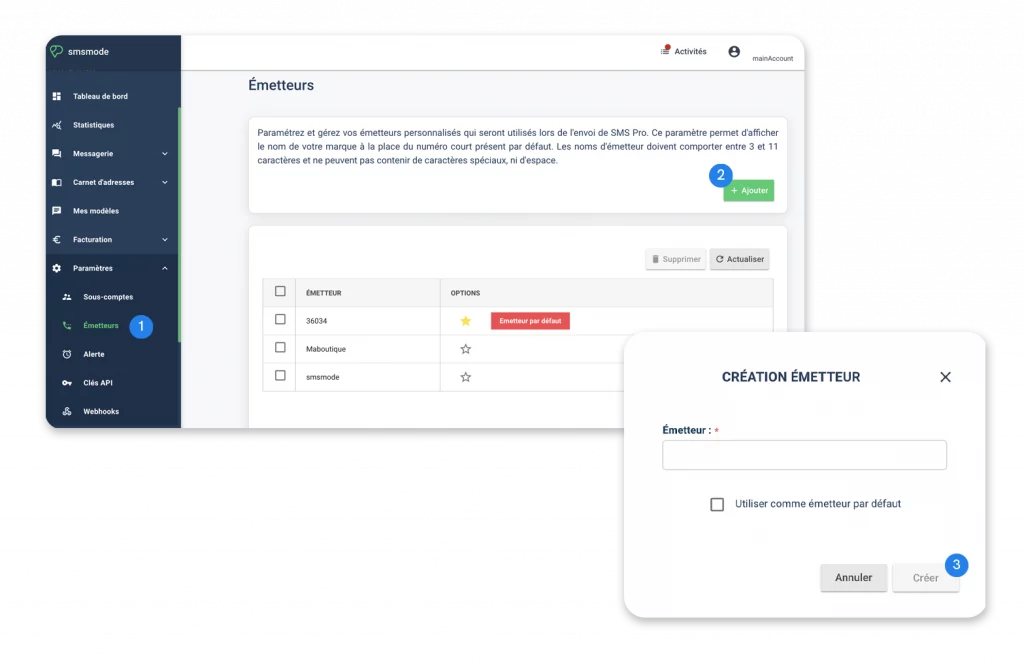
Go to the Settings menu, then click on Transmitters (1).

In the issuer name management area, click on the Add button (2) in the top right-hand corner.

A popup window appears. Enter the new sender name in the text field, then click on Create (3) to confirm.


2. Delete one or more custom transmitters

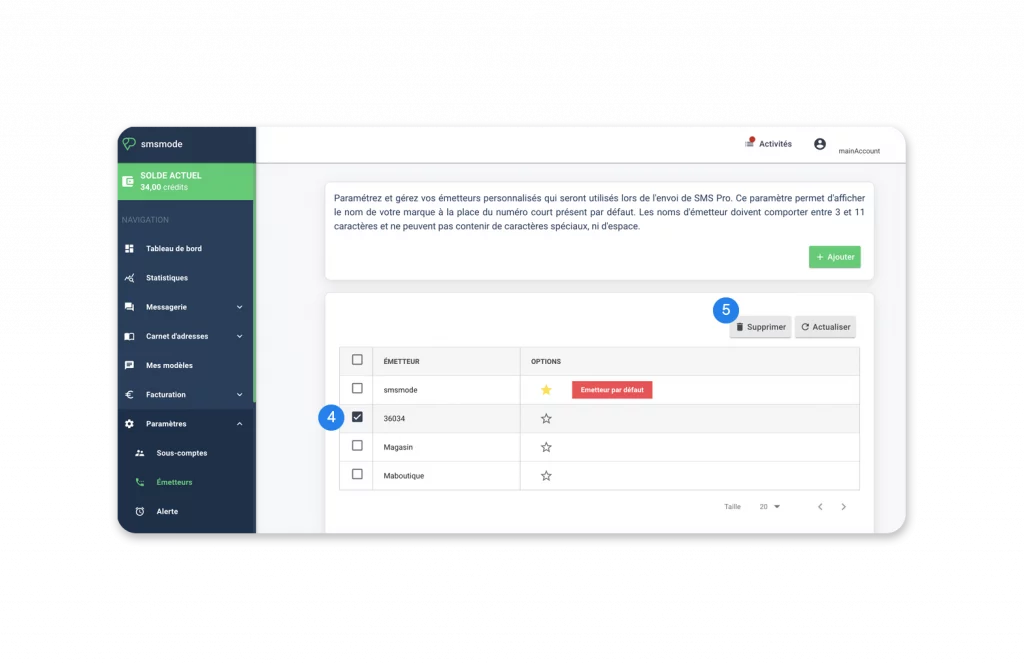
Click on the box next to the name of the sender(s) to be deleted (4).

Confirm by clicking on the Delete button (5) at the top right of the list.

3. Use a transmitter name as default transmitter

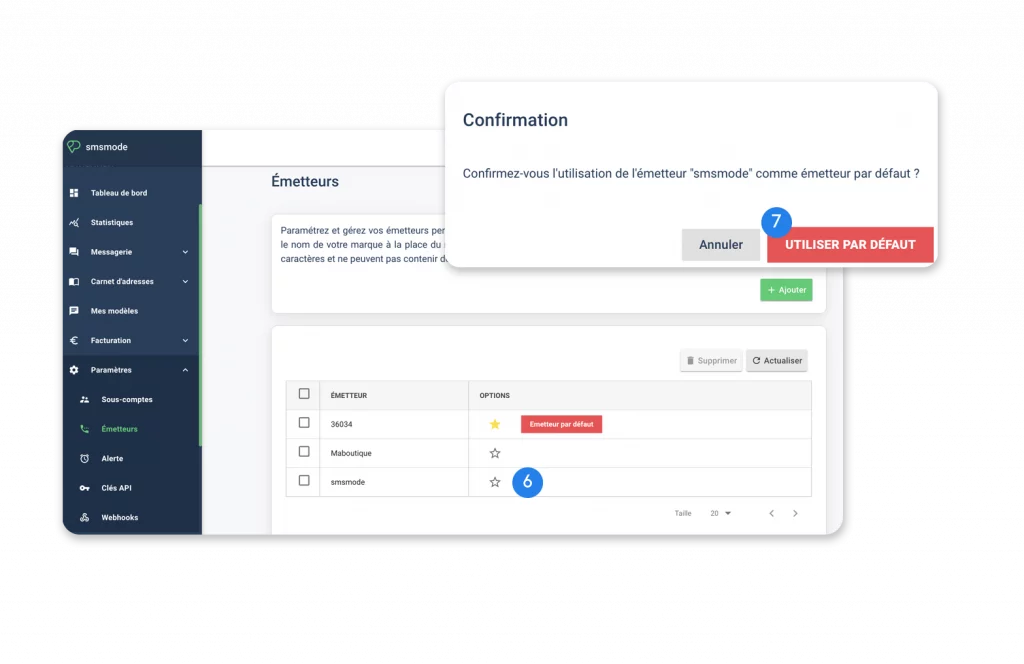
Click on the star (6) in front of the transmitter name you wish to set as default.

A popup window appears. Confirm the use of this transmitter as default by clicking on the Use default button (7).

Create your free account

Try out our SMS platform and benefit from 20 free test credits, with no obligation.
Need more info?
We look forward to hearing from you.

GSM characters accepted for sending from SMS

Discover all the characters supported by telecom operators. Character restrictions do not originate from our service, but from the harmonization of the GSM standard to make the SMS or Text Message service universal. Other types of limitations may exist, depending on the operator and the equipment used by your recipient.


How many characters do I need for my SMS ?

The size of your text, i.e. the number of characters in your message, depends on the encoding method you choose when sending SMS :

Maximum 160 characters per SMS. If your message exceeds 160 characters, the SMS are automatically concatenated (linked together so that the end-user receives only one on his device). up to 5 SMS concatenated

70 characters maximum, the cost of 1 SMS sent per recipient every 70 characters and it handles all Unicode characters, including emoticons.

What's special about "special" characters?

Good practice

Before sending a massive SMS campaign through our API or Customer Area (GUI) solutions, we recommend that you always send a test SMS to validate the encoding of your text message and check that the special characters are identical to your initial request.

List of GSM characters and their encoding

Useful information: if you use our online platform, the REST API or a plugin, you can type the accepted characters directly, without using their ISO codes. Only uploads via the HTTP API require ISO codes for certain characters.

CHARACTERISTICS

ISO CODE 8859-15

New line

%OA

Back to cart

%OD

Space

+

!

%21

"

%22

#

%23

$

%24

%

%25

&

%26

%27

(

%28

)

%29

*

*

+

%2B

,

%2C

.

.

/

%2F

{

%7B *

|

%7C *

}

%7D *

~

%7E *

[

%5B *

\

%5C *

]

%5D *

^

%5E *

0

0

1

1

2

2

3

3

4

4

5

5

6

6

7

7

8

8

9

9

:

%3A

;

%3B

<

%3C

=

%3D

>

%3E

?

%3F

@

%40

CHARACTERISTICS

ISO CODE 8859-15

A

A

B

B

C

C

D

D

E

E

F

F

G

G

H

H

I

I

J

J

K

K

L

L

M

M

N

N

O

O

P

P

Q

Q

R

R

S

S

T

T

U

U

V

V

W

W

X

X

Y

Y

Z

Z

a

a

b

b

c

c

d

d

e

e

f

f

g

g

h

h

i

i

j

j

k

k

l

l

m

m

n

n

o

o

p

p

q

q

r

r

s

s

t

t

u

u

v

v

w

w

x

x

y

y

z

z

CHARACTERISTICS

ISO CODE 8859-15

¡

%A1

£

%A3

%A4

¥

%A5

§

%A7

¿

%BF

Ä

%C4

Å

%C5

Æ

%C6

Ç

%C7

È

%C8

É

%C9

Ñ

%D1

Ö

%D6

Ø

%D8

Ü

%DC

ß

%DF

à

%E0

ä

%E4

å

%E5

æ

%E6

è

%E8

é

%E9

ì

%EC

ñ

%F1

ò

%F2

ö

%F6

ø

%F8

ù

%F9

Ü

%FC

%80 *

* These characters count double.

REMINDER

What is the GSM standard?

GSM (Global System for Mobile communication) is a standard for mobile telephony, in particular for sending SMS (Short Message Service). It is used worldwide to manage different encodings. Originating in Europe, this standard has conquered the world thanks to its performance. It was created to handle the multiplicity of mobile devices capable of receiving calls and SMS. The emergence and disappearance of telephone operators, and the arrival of new digital and analog transmission techniques, have made it necessary to comply with a standard in which characters are encoded in GSM-7. This encoding makes communication between several terminals universal.


Create your free account

Try out our SMS platform and benefit from 20 free test credits, with no obligation.
Need more info?
We look forward to hearing from you.

Integrate variables into SMS

Personalize your SMS with the SMS mailing option, which lets you integrate variables into your messages, for targeted communication with your customers. 

SMS in direct mail to make your messages unique

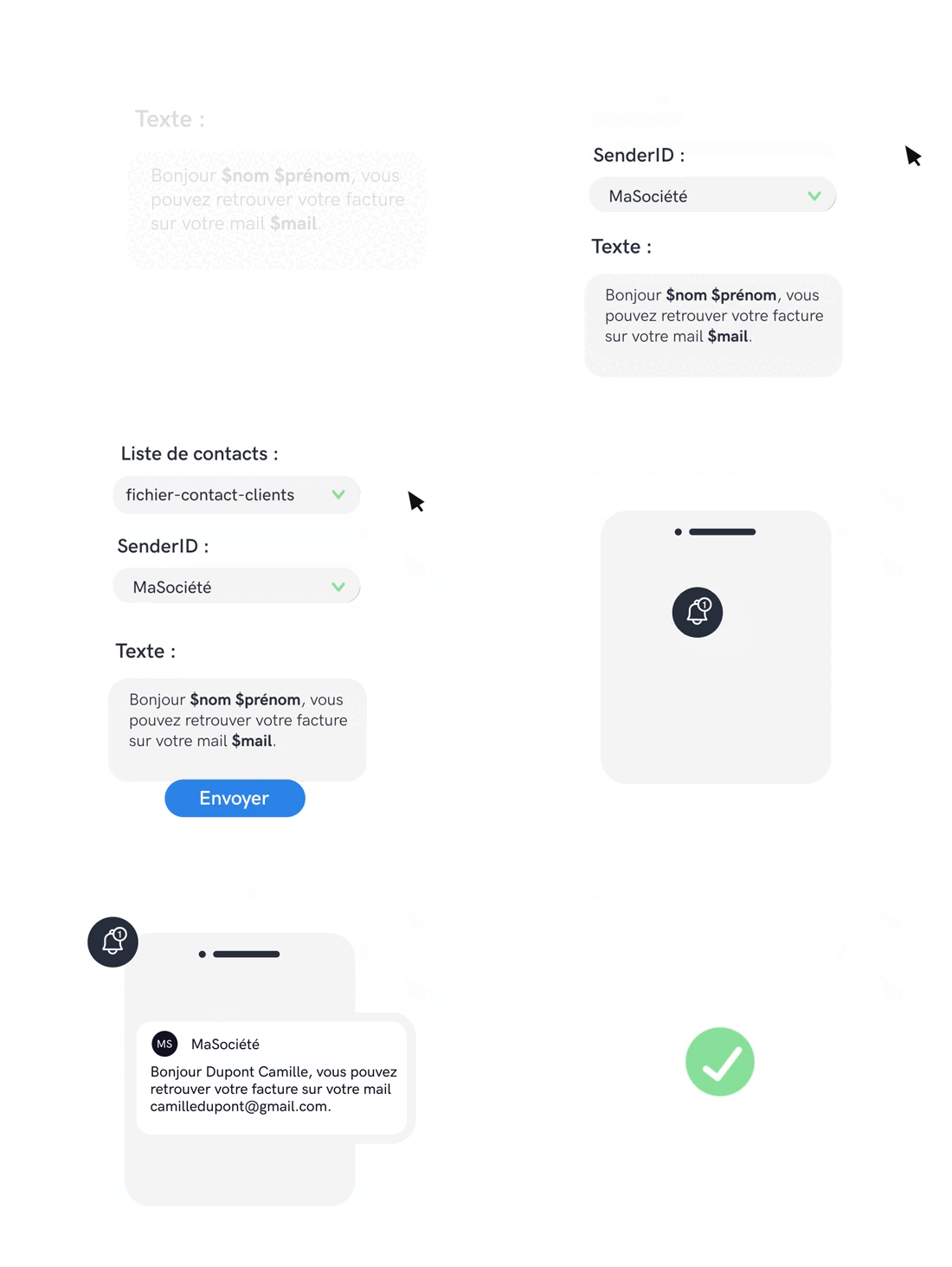
You can personalize each message in the same campaign by integrating the information contained in each of your contacts' files into the SMS , using the principle of direct mail. This SMS functionality feature lets you insert variables (4 personalization fields are available on our platform) for more personal communication with your contacts.

Anticipate the number of characters your variable should contain so as not to exceed the 160-character limit for a SMS (if you do, 2 credits will be deducted).

How to integrate SMS on your customer area?

Step 1

Import your contacts

You have 2 choices:

  • Import a new contact database with SMS mailing parameters, allowing you to personalize the message,
  • Check that these parameters are present in the list of recipients already created.

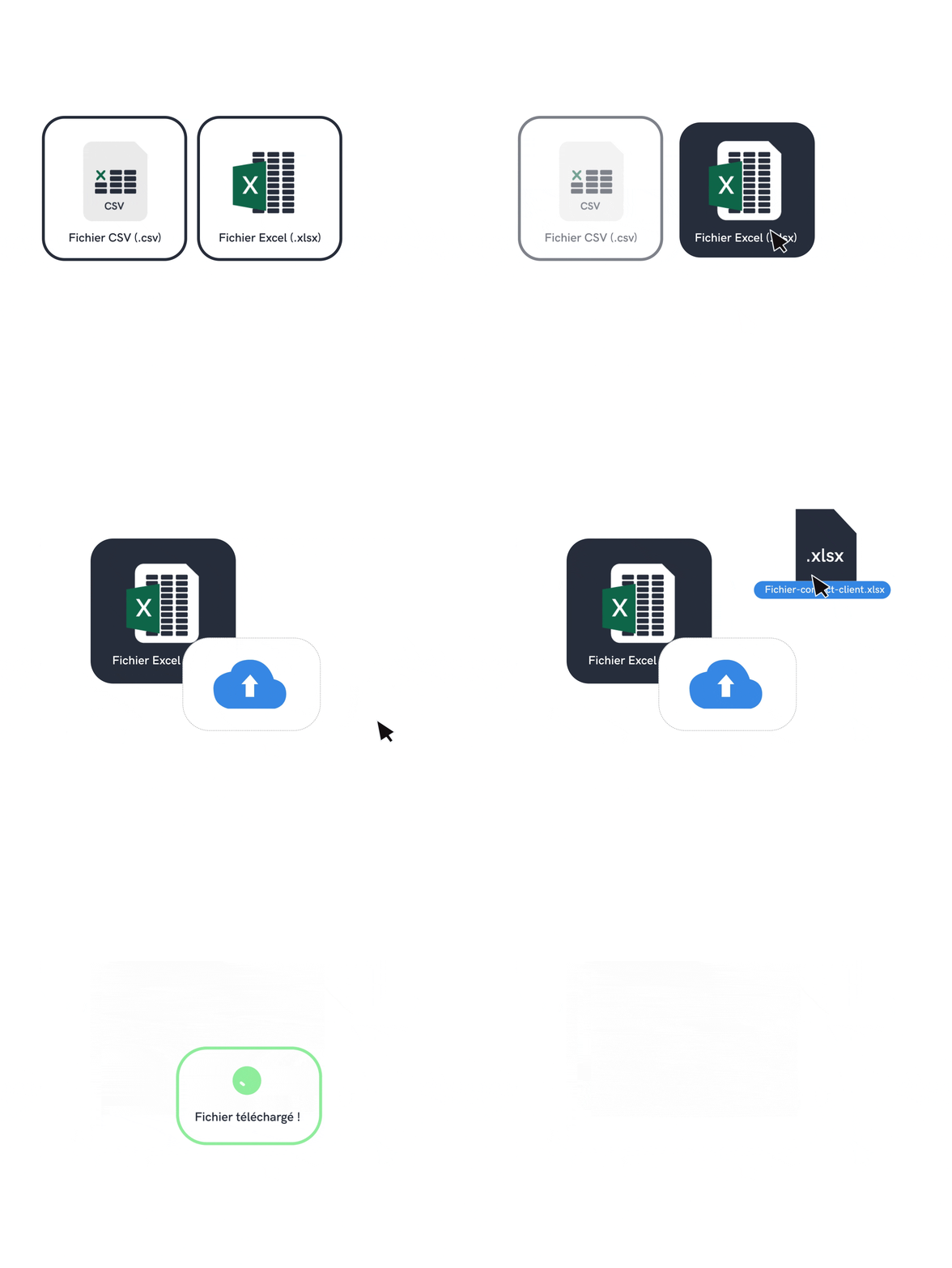
When importing Excel (.xls) or CSV (.csv) files,variable parameters are linked to their type ("last name", "first name", "e-mail", etc.) by selecting the right field for each column imported
(see beginner's guide in the FAQ).

Available variables
$name : integrates your contact's name
$firstname: (without emphasis) includes your contact's first name
$societe : (without emphasis) inserts the contents of the "Company" field for each contact
$email : includes the e-mail address entered in your contact's file
Step 2

Write your message

To send your personalized SMS , simply integrate the variable parameters into your message as you type. At the point where you want your custom field to appear, enter the name of the SMS mailing parameter beginning with "$".

Step 3

Send your message

Your message is now personalized; all that's left to do is fill in the other usual campaign parameters (immediate or scheduled sending, sender, STOP mention SMS, etc.) and click on the "Send" button.

Create your free account

Try out our SMS platform and benefit from 20 free test credits, with no obligation.
Need more info?
We look forward to hearing from you.